

Getting a Higgsfield API key
Make a Higgsfield API key at Open Higgsfield for pay-as-you-go models, and paste the whole key, ID and secret, into BosOn's Settings, Connections.
The Higgsfield API gives BosOn pay-as-you-go Higgsfield models, and it's the backup when your Higgsfield plan runs out of credits. It's a separate account from your higgsfield.ai plan, with its own balance in US dollars: your plan's credits don't apply to it. If you only want to use your plan, connect Higgsfield plan instead, which needs no key.
Make the key
Open Open Higgsfield
Go to open.higgsfield.ai, Higgsfield's API console, and sign up for an API account.
Add a payment method and some funds
The smallest top-up is $5. Funds last a year from when you add them, and failed generations aren't charged.
Generate a key
Generate a new key and call it BosOn.
Copy the whole key
The key is shown once. It has two parts, an ID and a secret, joined by a colon: ID:secret. Copy all of it, both parts and the colon.
Paste it into BosOn
Open Settings, Connections, then Higgsfield API. Paste the whole key into API key and click Save, then Test it. Balance and top-up shows what's left on the API and opens Open Higgsfield's billing.
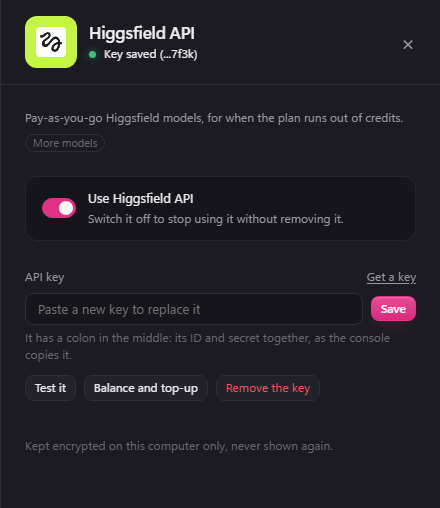
Its Use Higgsfield API switch turns it off without removing the key.
If it goes wrong
- "this key isn't valid": usually only half the key was copied. Make a new one and copy both parts with the colon between.
- The balance is too low: top up at open.higgsfield.ai, where you can also turn on automatic top-ups.