

Getting an Anthropic API key
Make an Anthropic key in the Claude Console, so BosOn can write and describe when your Claude plan isn't available.
BosOn writes captions, checks, angles and descriptions on your Claude plan through the Claude connection, at no extra cost. An Anthropic API key is the backup: pay-per-use Claude for when your plan isn't available. You don't need one to use BosOn with Claude.
Make the key
Open the Claude Console
Sign in at platform.claude.com and open API keys. Click Create key.
Name it
Call it BosOn. Leave it linked to yourself, with no expiry, so BosOn doesn't stop working when it runs out.
Copy the key
The Console shows the key once. It starts with sk-ant-. Copy all of it.
Paying for it
The API is paid from prepaid credits: Settings, Billing, Buy credits. If you have a Claude Max or Team plan, Anthropic includes some monthly API credits with it, which you claim by linking your Console organisation to your plan; they show under Promotional credits in Settings, Billing. Anthropic's guide to API credits for subscribers explains how.
Paste it into BosOn
Open Settings, Connections, then Anthropic API. Paste the key into API key and click Save, then Test it.
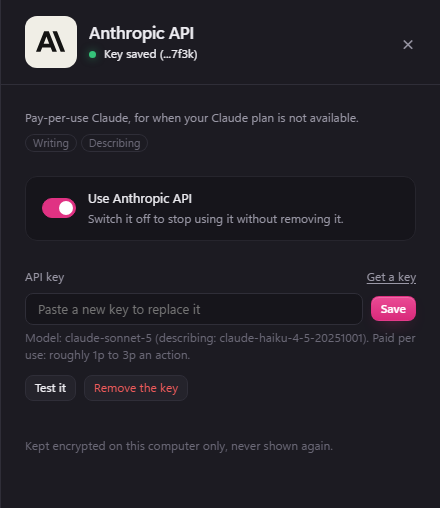
Its Use Anthropic API switch turns it off without removing the key.
If it goes wrong
- "Anthropic says the account has no credit": press Top up beside the message, or buy credits in Settings, Billing at platform.claude.com.
- "Anthropic says this key isn't valid": the key was deleted, archived, or not copied whole. Make a new one and paste it in.