
Connecting OpenRouter
Connect your OpenRouter account to BosOn in one click, or paste a key, for video models, ElevenLabs voices and writing paid from your OpenRouter credit.
With OpenRouter connected, BosOn runs Seedance, Kling, Veo and more video models, Micro Studio's pictures, ElevenLabs' voices and its writing on your own OpenRouter account, paid from your OpenRouter credit. OpenRouter is one account and one balance for many companies' models.
Add some credit first
OpenRouter works from a balance in US dollars, paid as you go. Add a few dollars at openrouter.ai/settings/credits, try a few clips, and top up when you know what you use. Each model's price shows in BosOn before you press Make it.
From OpenRouter's FAQ, read on 11 October 2026: OpenRouter charges a fee of 5.5% ($0.80 minimum) when you buy credit, and may expire credit left unused for a year.
Connect in one click
Open OpenRouter in Connections
In BosOn, click your initial at the top right, then Connections, then OpenRouter, and click Connect with OpenRouter. (Settings, Connections on the left, is the same place.)
Sign in and approve BosOn
OpenRouter opens in your browser. Sign in, and approve BosOn. OpenRouter names it after the address on this computer (localhost and a number), because BosOn runs on your PC.
Come back to BosOn
BosOn connects by itself. You don't copy or paste anything.
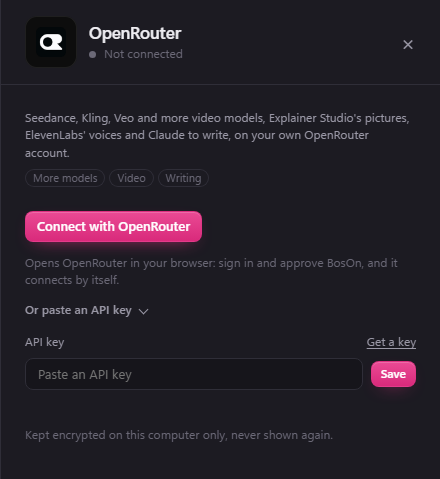
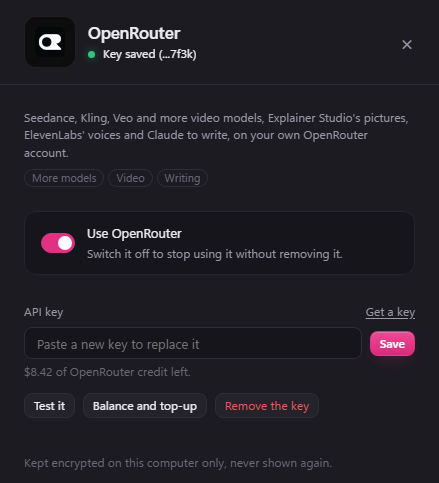
Once it's connected, the panel shows the credit you have left, such as $8.42 of OpenRouter credit left. Balance and top-up opens OpenRouter's credits page.
Or paste a key
If you'd rather make the key yourself:
- Sign in at openrouter.ai/settings/keys and create a key. Call it
BosOn. - Give it a credit limit if you like, so it can never spend more than you choose.
- Copy the whole key.
- In BosOn, open Settings, then Connections, then OpenRouter, click Or paste an API key, paste it in and click Save.
What it unlocks
- Video: more video models under More models in the Video tool, including Seedance, Kling and Veo, each priced on Make it.
- Micro Studio's pictures: Micro Studio can draw an explainer's scenes on OpenRouter. New picture and Edit picture still use Gemini, OpenAI or your Higgsfield plan.
- Voices: if you haven't connected ElevenLabs yourself, the Voice tool offers 21 of ElevenLabs' stock voices, under ElevenLabs on OpenRouter.
- Writing: captions, scripts and picture descriptions. Claude Sonnet 5.5 writes and Claude Haiku 5.5 describes pictures; you can change either in Settings, AI.
Switching it off
Turn off Use OpenRouter in its panel, or the switch on its tile in Settings, Connections. BosOn stops using OpenRouter but keeps the key, so switching it back on needs nothing else.
If it goes wrong
- "this key isn't valid": the key was deleted or not copied whole. Click Connect with OpenRouter again, or paste a new key.
- No credit left: top up at openrouter.ai/settings/credits.
- It reached its spending limit: the key hit the credit limit you gave it. Raise the limit on OpenRouter's keys page, or make a new key.