

Getting a fal API key
Make a fal key so BosOn can run pictures, video, Collider, voices, music and upscaling on your own fal balance, paid in dollars, and paste it into BosOn's Settings, Connections.
With a fal key, every BosOn tool can run on fal: pictures, video, Collider, Micro Studio, the Sound Lab and the Timeline's upscale. fal is one account and one balance in US dollars for many companies' models, each priced by its own unit (a picture, a second of video, a thousand characters).
Add some credit first
fal works from a balance in US dollars, paid as you go. Add a few dollars at fal.ai/dashboard/billing, try a few things, and top up when you know what you use. Each model's price shows in BosOn before you press Make it.
Make the key
Open your API keys
Sign in at fal.ai/dashboard/keys and click Create Key. Call it BosOn. If you're in a team on fal, choose the team at the top left first, since a key belongs to the account that made it.
Choose Full access
Choose Full access, so BosOn can check your balance before each job.
Copy the key
Copy the whole key straight away: fal shows it only once.
Paste it into BosOn
Open Settings, Connections, then fal API. Paste the key into API key and click Save, then Test it. With a Full access key, the panel shows what's left, such as $12.40 left on fal. In the next desktop build, Test it says Key works. Balance: $12.40 instead; an API key just says Key works.
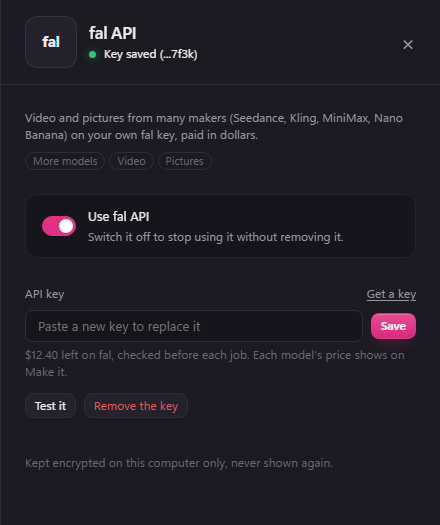
Its Use fal API switch turns it off without removing the key.
Make fal pay first
To have everything run on fal, open Settings, Who pays and set Primary to fal. Choose a Secondary, such as your Higgsfield plan, and if fal runs out of credit BosOn stops and offers to carry on with it. See Who pays.
If it goes wrong
- "this key isn't valid": the key was deleted, or not copied whole. Make a new one and paste it in.
- No credit left: fal stops every job once your balance runs out. Top up at fal.ai/dashboard/billing, then Resume, or carry on with your Secondary.
- A job failed: BosOn shows it as failed. fal's dashboard lists every request and what it cost.