

Getting an ElevenLabs API key
Make an ElevenLabs key for BosOn, with exactly the permissions it needs for voiceovers, and paste it into BosOn's Settings, Connections.
With an ElevenLabs key, BosOn makes voiceovers in your own ElevenLabs voices, cloned ones included, in the Voice tool and for explainers. It's paid from your ElevenLabs plan's characters: about one character for each letter, and half that on the Flash models.
Make the key
Open your API keys
Sign in at elevenlabs.io and click Developers at the bottom left, then the API Keys tab (or go straight to elevenlabs.io/app/developers/api-keys). Click Create Key.
Name it
Call it BosOn, so you know which key is which later.
Restrict it to what BosOn uses
Leave Restrict Key on, and give it only these:
| Permission | Choose | What BosOn uses it for |
|---|---|---|
| Text to Speech | Access | Making the voiceover |
| Voices | Read | Listing your voices to pick from |
| Models | Access | Choosing the ElevenLabs model |
| User | Read | Showing the characters you have left this month (optional: without it everything works, just no count) |
Leave everything else on No Access.
Leave the limits as they are
A credit limit is optional; it's only worth setting if usage-based billing is on in your ElevenLabs account. Leave the IP list empty and the expiry on Never, or BosOn will stop working when your internet address changes or the key runs out.
Copy the key
Click Create. ElevenLabs shows the key once, so copy it now. Afterwards it only shows the last four characters.
Paste it into BosOn
Open Settings, Connections, then ElevenLabs. Paste the key into API key and click Save, then Test it.
When it works, the panel says how many characters you have left this month, such as 18,250 of 30,000 characters left this month, until 1 November. Your ElevenLabs voices appear in the Voice tool next to Higgsfield's, with a filter for each.
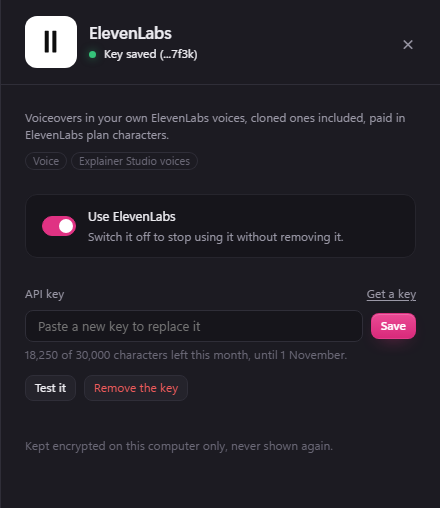
Its Use ElevenLabs switch turns it off without removing the key.
For the Sound Lab
To make sound effects and music, and clean up a recording, in BosOn's Sound Lab, edit the key in ElevenLabs (the ... menu next to it, then Edit) and add Sound Effects, Music and Audio Isolation, each on Access. ElevenLabs' music needs a paid ElevenLabs plan.
If it goes wrong
- "ElevenLabs says this key may not do that": a permission above is missing. BosOn names which one. Edit the key in ElevenLabs and add it; you don't need a new key.
- "ElevenLabs says this key isn't valid": the key was deleted, or not copied whole. Make a new one and paste it in.
- "ElevenLabs says the account has no characters left this month": press Top up beside the message to open your ElevenLabs subscription, add characters or change your plan, then try again.
- Personal keys need a full seat. If you're in someone else's ElevenLabs workspace and can't make a key, ask its owner.