

Signing in to BosOn
Sign in with an emailed code: what works without signing in, using BosOn on two computers, and working offline.
You sign in to BosOn with your email. There's no password: BosOn emails you a six-digit code each time.
What works without signing in
Your library always opens. Without signing in you can browse, organise, preview, add files and export, and anything already being made still arrives.
Creating with AI, editing and posting need you to sign in. Click any of them and BosOn opens the sign-in box.
Sign in
- Click Sign in, by the bell at the top right. It shows while you're signed out.

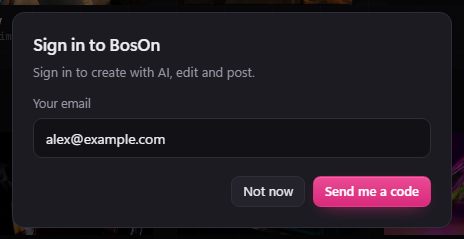
- Type your email and click Send me a code. During early access, use the email you joined the list with.
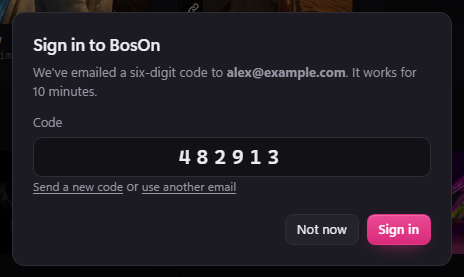
- Check your email for the six-digit code. Type it in and click Sign in. The code works for 10 minutes. If it doesn't arrive, click Send a new code.
Using BosOn on two computers
Your account works on two computers. If you sign in on a third, BosOn asks which one this computer replaces. It starts with the one you haven't used for longest. Choose one and click Use BosOn here instead.
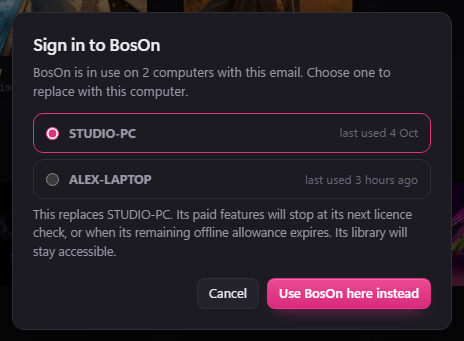
The computer you replace keeps its library. Its paid features stop at its next licence check, or when its remaining offline allowance runs out.
To free a computer's place yourself, sign out on that computer (see below).
Working offline
BosOn checks your account when it opens and once a day, and every 10 minutes after a check that couldn't get through. If your computer is offline, BosOn keeps working until 7 days after the last check that got through. Settings, Your BosOn shows the exact date.
If a check says this computer has been replaced, or access has been withdrawn, the features that need signing in stop straight away. Your library still opens.
Your BosOn in Settings
Open Settings (or press Ctrl+,). Your BosOn is first. It shows the email you're signed in with, this computer, until when it works offline, and the computers on your account.
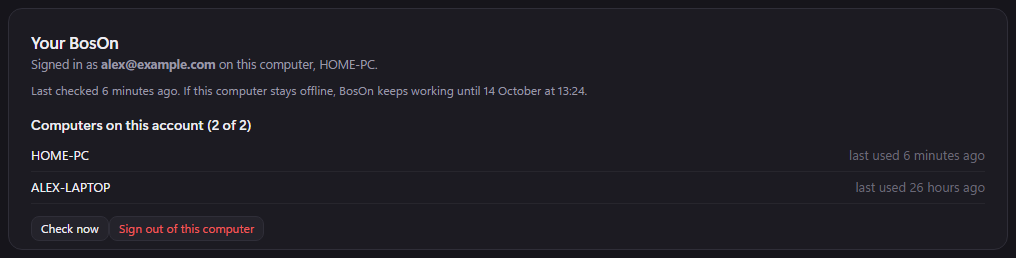
- Check now checks your account straight away.
- Sign out of this computer frees its place on your account for another computer. Your library stays as it is.